
The Complete Guide to Watching YouTube Together
YouTube has become the world's largest video platform, with billions of hours of content to explore. Watching it together with friends makes the experience even better—whether you're reacting to music videos, binging a documentary series, or catching a live premiere. Here's your complete guide to watching YouTube together using SyncUp.
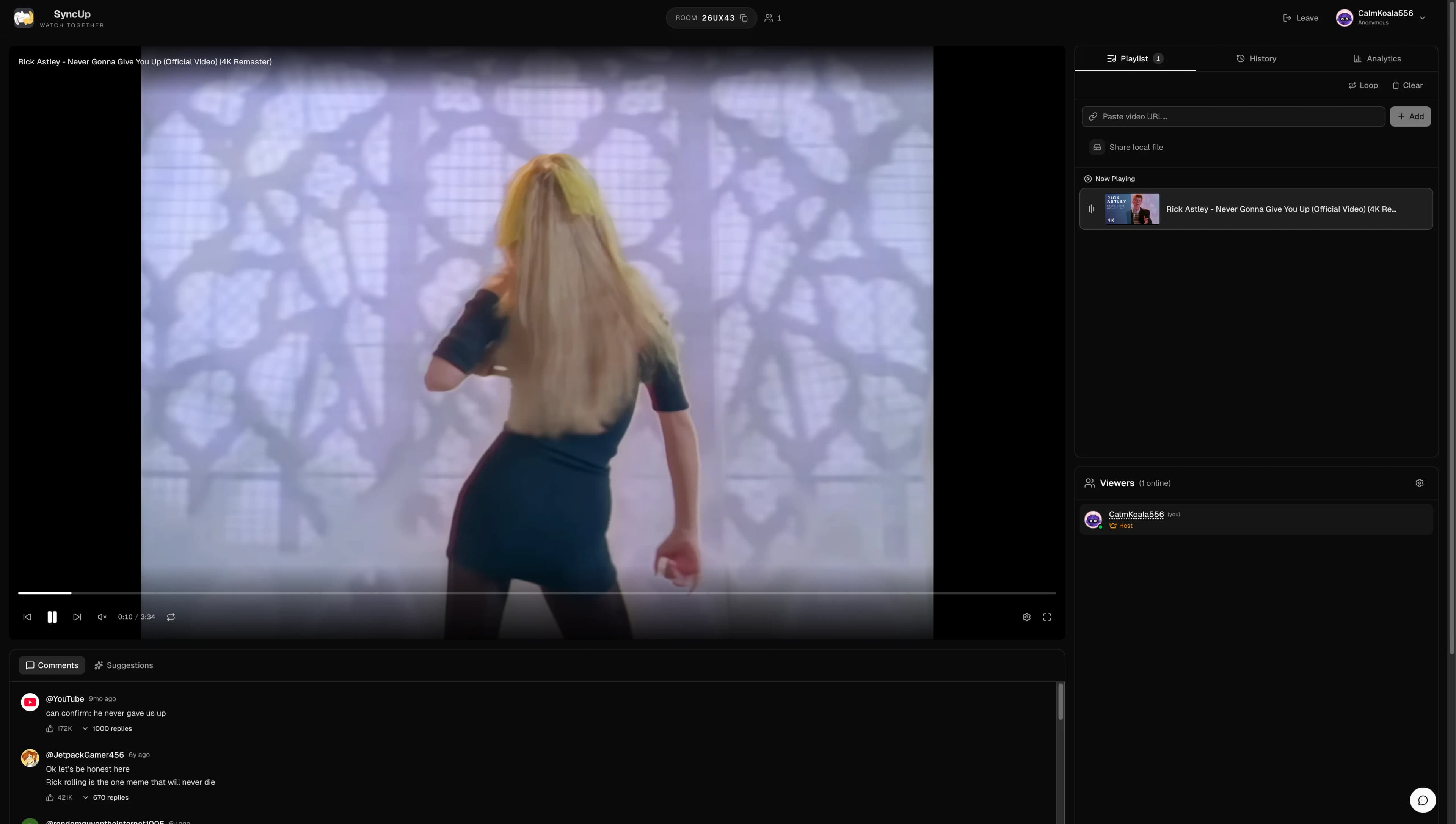
Getting Started with SyncUp
SyncUp makes it incredibly easy to watch YouTube videos in perfect sync. No account needed, no downloads required—just create a room and start watching. Here's the quick-start process:
- Create a room - Visit SyncUp and enter a name for your watch party
- Share the code - Send the unique room code to your friends via text, Discord, or any messaging app
- Add videos - Paste any YouTube URL into the video input field
- Start watching - Press play and everyone watches in sync!
How YouTube Sync Works
When you add a YouTube video to your SyncUp room, the synchronization happens automatically. Here's what that means for your watch party:
- Play/Pause: When anyone with control permissions pauses, everyone pauses instantly
- Seeking: If someone skips ahead or back, everyone jumps to the same spot
- Buffering: The player automatically pauses if someone needs to buffer, so no one misses anything
- Latency Compensation: The player adjusts for different connection speeds to keep viewers together
How Sync Works
SyncUp is designed to compensate for latency differences between viewers. When playback drifts, the player adjusts to bring everyone back together—helpful for reaction videos and live premieres where timing matters.
Creating and Managing Playlists
Queue up multiple videos for uninterrupted viewing sessions. SyncUp offers powerful playlist features that make marathon watching easy:
- Individual videos: Paste YouTube URLs one by one to build your queue
- Import playlists: Paste a YouTube playlist URL to import all videos at once
- Reorder: Drag and drop to rearrange your queue on the fly
- Remove:Easy removal of videos you don't want
- Loop: Set individual videos or the entire playlist to loop
- Voting: Enable playlist voting to let everyone choose what plays next
Popular Use Cases for YouTube Watch Parties
People use SyncUp to watch YouTube together for all kinds of occasions. Check out our comprehensive guide to watch party use cases for even more ideas:
Long-Distance Date Nights
Watch music videos, comedy clips, or documentaries together with your partner across any distance. Pair with FaceTime or a video call for the complete experience. See our guide to long-distance movie dates for more tips.
Friend Group Hangouts
React to trending videos together, share memes, or binge a YouTube series with your friend group—even when you can't be in the same room.
Study Groups
Watch educational content together as a study group. Pause to discuss, take notes, and learn collaboratively.
Music Listening Parties
Host album release listening parties with friends. Experience new music videos and live performances together.
Watching YouTube Music Together
Host virtual listening parties with YouTube Music videos. This is perfect for album releases, music video premieres, or just sharing your favorite songs with friends. Create a playlist of music videos and enjoy a virtual concert experience together. Many fans use SyncUp for K-pop comebacks, artist premieres, and award show watch parties.
YouTube Live Streams
Watch YouTube premieres and live streams together with friends. This is perfect for gaming events, concerts, creator live streams, and special premieres. Experience the excitement of live content with your friends, regardless of where everyone is located. SyncUp handles live streams with the same precision as regular videos.
Mobile and Device Compatibility
SyncUp works on virtually any device with a modern web browser:
- Desktop: Chrome, Firefox, Safari, Edge, and other modern browsers
- Mobile: iOS Safari, Android Chrome, and mobile Firefox
- Tablets: iPad Safari, Android tablets, and more
While desktop offers the best viewing experience with more screen real estate, you can absolutely join watch parties from your phone or tablet. The interface adapts to your screen size automatically.
Tips for the Best Experience
Want to make your YouTube watch party unforgettable? Our guide to hosting the perfect watch party covers everything in detail. Here are some quick tips:
Use a stable internet connection
Wired connections are more reliable than Wi-Fi for streaming. If using Wi-Fi, stay close to your router.
Keep your browser updated
Latest browser versions offer the best video playback compatibility and performance
Use a separate voice chat alongside
Run Discord, FaceTime, Zoom, or WhatsApp on another screen for live reactions and better audio quality
Create playlists ahead of time
Prepare your queue before friends join for seamless viewing—no awkward pauses while searching
Troubleshooting Common Issues
Having trouble? Here are solutions to the most common issues:
Video not playing?
Try refreshing the page. If the issue persists, check that the YouTube video isn't age-restricted or region-locked. Some videos have playback restrictions that prevent embedding. See YouTube Help for more details on playback restrictions.
Out of sync with friends?
Have the room host click the play button to resync everyone. If you're consistently out of sync, check your internet connection. A stable broadband connection works well for streaming video.
Can't control playback?
The room host controls who can play/pause videos. Ask the host to give you moderator permissions, or check the room permissions panel.
Ad blockers causing issues?
Some ad blockers can interfere with YouTube playback. Try disabling your ad blocker for SyncUp, or add it to your whitelist.
How SyncUp Compares to Alternatives
There are several ways to watch YouTube together online. SyncUp works entirely in your browser—no downloads, no extensions, no account required. For a detailed comparison with other platforms like Watch2Gether and Teleparty, check out our Best Watch Party Apps comparison guide.
Frequently Asked Questions
Frequently Asked Questions
To watch YouTube with friends online, use a free sync platform like SyncUp. Create a room, share the room code with your friends, and paste any YouTube URL. Everyone in the room will see the video play in perfect sync automatically.
Yes. The basics are free: rooms, sync, chat, playlist voting, friends, and watching YouTube. Free rooms hold up to 5 people. There's an optional Plus plan if you want bigger rooms or longer voice chat, but you don't need it. No account required to get started.
No, SyncUp works entirely in your browser with no downloads or extensions required. Just visit the website, create a room, and start watching. It works on any modern browser including Chrome, Firefox, Safari, and Edge.
Yes, SyncUp works on mobile browsers including iOS Safari and Android Chrome. While the desktop experience offers the most screen space, you can join watch parties from your phone or tablet without any issues.
Yes, you can paste a YouTube playlist URL directly into SyncUp and it will import all videos from that playlist into your room queue. You can also add individual videos one at a time.
SyncUp is designed to pair with your favorite communication app. Most users run Discord, FaceTime, Zoom, or WhatsApp alongside SyncUp. This gives you better call quality than any built-in chat could offer, plus you keep using tools you already know.
Start Watching YouTube Together
Ready to experience synchronized YouTube watching? Create your first watch party in seconds—no download, no signup required.
Create a Watch PartyRelated Articles
Keep Exploring
Ready to try SyncUp?
Start your free watch party now and experience synchronized video watching.
Create a Watch Party