
How to Host the Perfect Online Watch Party
Whether you're planning a long-distance movie night with friends, organizing a viewing party for a premiere, or running a remote team bonding session, these tips will help you host a watch party that everyone will want to repeat.

1. Choose the Right Content
The success of your watch party starts with picking the right content. Consider your audience and choose something everyone will enjoy. Here's how to make the best choice:
- Send out a poll beforehand to let participants vote on what to watch
- Consider the mood—comedy for casual hangouts, thrillers for excitement, documentaries for learning together
- YouTube offers everything from music videos to full documentaries and creator content. Browse YouTube for ideas
- For longer sessions, create a playlist with multiple shorter videos to keep energy high
- Have backup content ready in case your first choice doesn't land well
2. Set Up Your Room Early
Don't wait until the last minute. Create your SyncUp room at least 10-15 minutes before the scheduled time. This gives you time to:
- Test the video playback and ensure everything is working
- Share the room code with all participants
- Queue up your videos in the playlist
- Welcome early arrivers and get everyone settled
- Troubleshoot any issues before the main event starts
Pro Tip
Create a group chat (Discord, WhatsApp, etc.) alongside your watch party for voice chat and reactions. This makes the experience feel more like watching together in person! You can also use video chat to see everyone's reactions.
3. Test Your Connection
A stable internet connection is key to a smooth watch party. Before the party starts:
- Close unnecessary browser tabs and applications
- Ask participants to do the same
- If possible, use a wired connection instead of Wi-Fi for better stability
- Test the video playback solo first to ensure there are no issues
- A stable broadband connection helps ensure smooth streaming
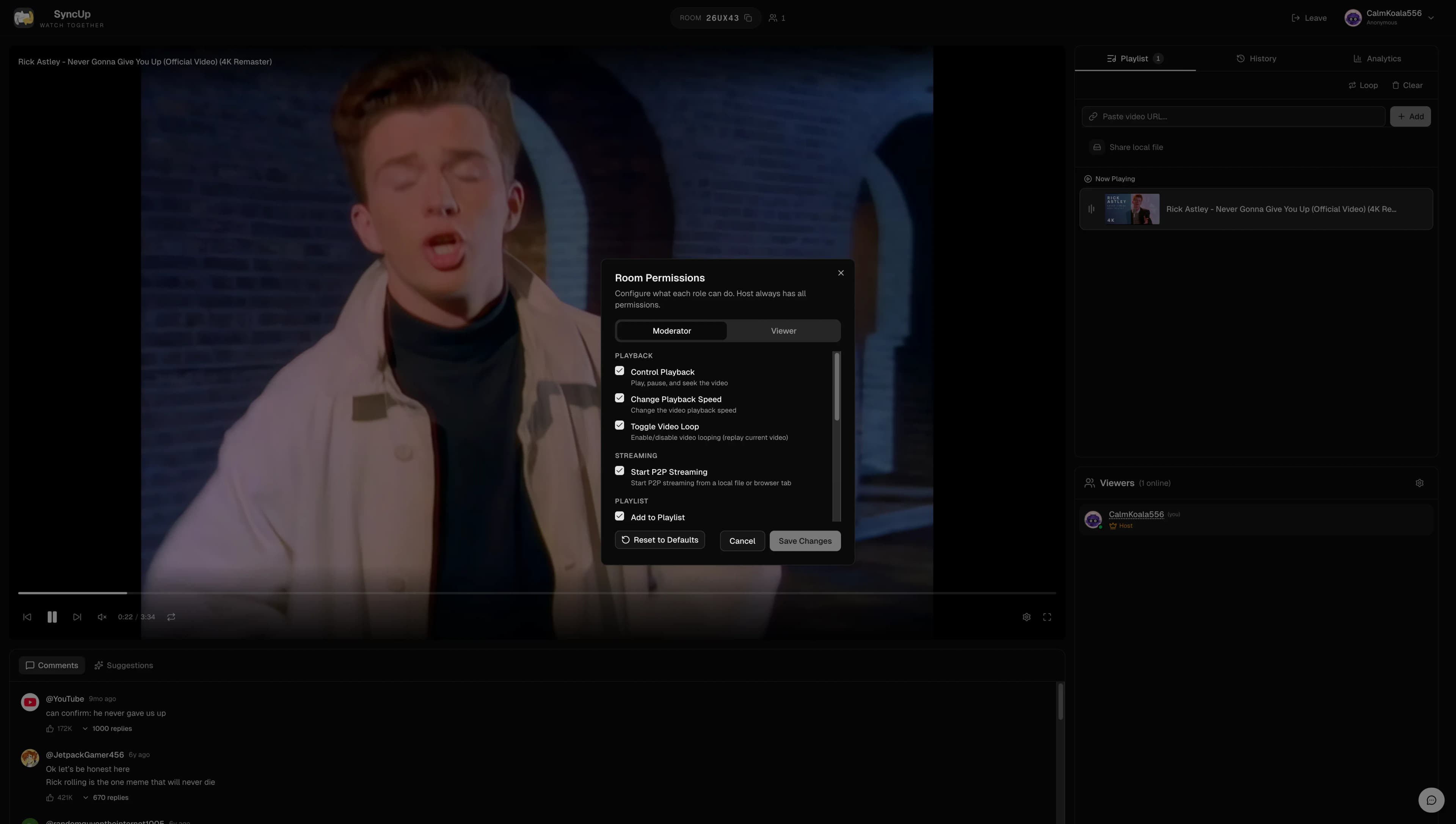
4. Manage Permissions Wisely
Most watch party platforms let you control who can do what during your session. As the host, you typically can:
- Promote trusted friends to moderators so they can help manage playback
- Control whether viewers can add videos to the playlist
- Decide who can control play, pause, and seeking
- Enable or disable playlist voting
- Keep things running smoothly by managing who has what permissions
5. Create a Playlist
Queue up multiple videos in advance to keep the party flowing without awkward pauses. A good playlist feature lets you:
- Add individual YouTube videos one by one
- Import entire YouTube playlists with a single link
- Reorder videos by dragging and dropping
- Let everyone see what's coming up next
- Enable voting to let your guests influence the queue
6. Handle Time Zone Differences
If your guests are spread across different time zones, coordination takes a bit more planning:
- Use a time zone converter (like worldtimebuddy.com) to find overlap
- Send calendar invites that automatically show the correct local time
- For recurring watch parties, rotate the time so the same people aren't always inconvenienced
- Consider weekend afternoons which often work across multiple time zones
- Record your voice chat for friends who couldn't make it live
7. Theme Ideas for Watch Parties
Make your watch party memorable with a theme:
Music Video Marathon
Everyone adds their favorite music videos to the queue. Vote on the best ones or guess who added what.
Comedy Night
Queue up stand-up specials, comedy sketches, or funny video compilations. Great for casual hangouts.
Gaming Night
Watch esports tournaments, speedruns, or let's play videos together. Perfect for gaming friend groups.
Documentary Club
Pick a topic and watch documentaries together. Pause for discussion and share insights.
Award Show Watch Party
Watch live premieres, award ceremonies, or sports events together. Make predictions and compete for bragging rights.
8. Keep Everyone Engaged
A great watch party is interactive. Here are ways to keep the energy up:
- Encourage reactions and commentary—don't just watch in silence
- Take breaks between longer videos to discuss and stretch
- Use the playlist voting feature to give everyone a voice
- Play games like "guess what happens next" or "who added this video"
- Have snacks ready and encourage others to do the same for the full experience
Frequently Asked Questions
To host an online watch party, use a free platform like SyncUp. Create a room, share the room code with your guests, and add videos to your playlist. As the host, you control playback and can manage who has permissions to add videos or control the player.
You need a device with a modern web browser, a stable internet connection, and the content you want to watch (YouTube videos, for example). No downloads, extensions, or account creation required with SyncUp. For voice chat, use Discord, FaceTime, or Zoom alongside the watch party.
SyncUp rooms can accommodate many viewers simultaneously. There's no strict limit, but for the best experience with conversation, groups of 2-10 people work well. Larger groups can work great for passive viewing of live events.
Yes, SyncUp has a comprehensive permissions system. As host, you can control whether viewers can add videos, control playback, reorder the playlist, and more. You can also promote trusted friends to moderator status.
Pick a time that works best for the majority, or rotate timing for recurring watch parties. Use a time zone converter and send calendar invites with the correct local times. Consider recording the group's voice chat for anyone who can't make it live.
Use your favorite voice or video chat app (Discord, FaceTime, Zoom, WhatsApp) alongside SyncUp. This gives you better audio quality than any built-in chat, and you can see reactions in real-time if using video.
Ready to host your watch party?
Put these tips into action and create an unforgettable virtual movie night with SyncUp. No downloads, no signups—just create and share.
Create a Watch Party NowKeep Exploring
Ready to try SyncUp?
Start your free watch party now and experience synchronized video watching.
Create a Watch Party