
A watch party room is a pretty good listening party room. It already has a shared queue, voting, chat and voice. The one thing it was missing was a way to play actual music that did not involve a YouTube upload of a static album cover. As of today, SyncUp plays SoundCloud tracks and playlists, and YouTube Music tracks, and it has a music player built for them instead of squeezing songs into the video box.
What You Can Paste
It works the same way as video. Paste a link in the room, hit Add, and everyone hears the same second of the same song. These links are recognized:
- SoundCloud tracks. Regular track links, private share links, and the short on.soundcloud.com links the mobile app hands out.
- SoundCloud playlists and sets. Paste a /sets/ link and the button changes to Add Playlist. The first few tracks start playing within a couple of seconds while the rest fill in behind them. Sets are capped at 100 tracks.
- YouTube Music tracks. A music.youtube.com track link gets the music view with cover art and artist. If you copied the link from the address bar it usually drags a radio playlist along with it; SyncUp ignores that part and adds just the track.
Songs and videos share one queue. You can follow a Twitch VOD with three tracks and a YouTube video, and the player switches between the music view and the video box as the queue moves on. Playlist voting, shuffle, loop and role permissions all apply to tracks the same way they apply to videos.
The Music Player
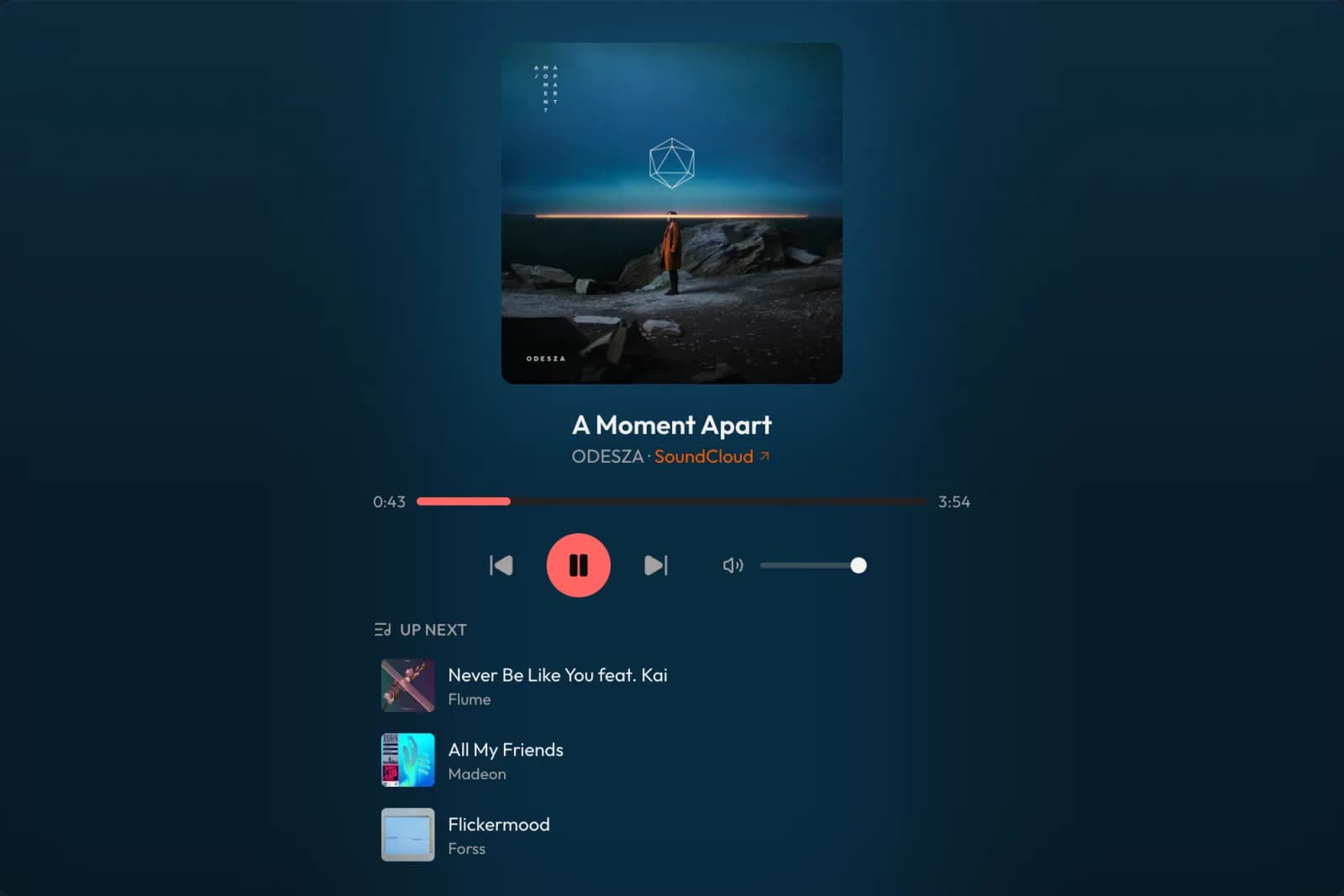
When a track is up, the 16:9 video box goes away. In its place you get square cover art with a soft glow behind it, tinted from the colours of the artwork, so a blue cover gives the room a blue wash and a red one a red wash. Under that: the title, the artist, and a SoundCloud or YouTube Music link back to the original track, because the people who made the music should get the click.
Below the art is a scrubber you can click anywhere on, the usual restart, play and skip buttons, and a volume slider that only affects you. Then an Up Next strip shows the next three tracks in the queue with their artwork, so you can see what is coming without opening the playlist panel. Clicking one jumps to it, if your role allows skipping.
The playlist and history panels got a small restyle too. Tracks show square artwork instead of a 16:9 thumbnail, with the artist in the subline, so a queue full of music does not look like a row of broken video thumbnails.
How It Stays in Sync
SoundCloud tracks play through SoundCloud's own embedded player, the same one you see on artist websites. The audio streams from SoundCloud to each listener directly; SyncUp never touches the audio. What SyncUp does is tell every embedded player in the room where to be, the same way it keeps YouTube players lined up. The server broadcasts the true position every 500ms and anyone who drifts more than 100ms gets nudged back.
YouTube Music tracks use the normal YouTube player underneath. YouTube requires that player to stay visible, so next to the cover art you will see a small video tile instead of a clean art-only view. That is a YouTube rule, not a design choice, and I would rather follow it than have the integration break.
Limits Worth Knowing
- SoundCloud Go+ tracks play a 30-second preview. SoundCloud only serves the full track inside its own app for those. Every embedded player has this limit, including SyncUp. Free tracks play in full.
- Embed-disabled tracks will not play. Uploaders can switch off embedding, and SyncUp respects that. You will get an error instead of audio.
- YouTube Music playlists and albums are added as regular videos. Only single YouTube Music tracks get the music view for now.
- SoundCloud sets stop at 100 tracks. Longer sets import the first 100 and tell you so.
Free, on Web and Mobile
Music is part of the free tier. Same rooms, same 5-person limit, same hour of voice chat a day, no Plus required. It works in mobile browsers with no extension, and the SyncUp app for iOS and Android has the same music view with the cover art, scrubber and up-next list. One thing to note on phones: your browser or the app may ask you to tap once before sound starts, because mobile platforms block audio that starts on its own.
What About Spotify?
It is the obvious next question, so here is the honest answer. Spotify playback works differently from SoundCloud: there is no embeddable player that streams full tracks, so each listener would stream through their own Spotify Premium account while SyncUp keeps the positions lined up. That is doable. What I cannot control is Spotify's approval process. An app needs Spotify to approve it for more than a handful of users before it is allowed to do this for the public, and that decision sits with them.
So I am not putting a date on it. If you paste a Spotify link today, SyncUp recognizes it and tells you it is not ready yet rather than failing with a generic error. If the approval comes through, this is the first place I will say so.
How to Try It
- Create a room from the homepage. No account needed; you can do it as a guest.
- Paste a SoundCloud or YouTube Music link in the Add box, either in the playlist panel or in the middle of the empty player.
- Share the room code or the invite link. Anyone who joins lands on the same second of the same track.
- Keep adding. Paste a whole SoundCloud set, let people vote tracks up the queue, and turn on shuffle if nobody can agree.
Frequently Asked Questions
Is music playback free?
Yes. SoundCloud and YouTube Music work on the free tier, in the same rooms, with the same 5-person limit and the same hour of voice chat per day. Nothing about music is behind SyncUp Plus.
Can I mix songs and videos in one queue?
Yes. The queue does not care. A SoundCloud track can sit between a YouTube video and a Twitch VOD, and the player switches to the music view when a track comes up and back to the video box when it is done.
Why does my SoundCloud track stop after 30 seconds?
That track is a SoundCloud Go+ track. SoundCloud only serves a 30-second preview of Go+ tracks outside its own app, and that applies to every embedded player, not just SyncUp. Free-to-stream tracks play in full.
Do YouTube Music playlists and albums work?
They get added, but as regular YouTube videos, not as music. Single YouTube Music tracks get the music view with cover art and artist. Playlist and album links are queued the way any YouTube playlist is, one video per item.
Does it work on phones?
Yes. Music plays in mobile browsers without an extension, and the SyncUp app for iOS and Android has the same music view with cover art, scrubber and up-next list.
What about Spotify?
Not yet. Spotify playback depends on Spotify approving the app for more than a handful of users, and that approval is out of my hands, so there is no date. If you paste a Spotify link today SyncUp will tell you it is not ready and suggest a SoundCloud or YouTube Music link instead.
Start a Listening Party
Create a room, paste a SoundCloud set, and send the code to whoever you want to hear it with. Free, no signup, works on phones.
Create a Room